Sol for iPhone
Catch the light you love.
Weather apps tell you if it will rain. Sol tells you when the light is worth stepping outside for.

Tap the tabs to look around the app.
Get early access to Sol for iPhone.
The light, at a glance.
- The sunset forecast Will tonight be worth it? Sol says so hours ahead, in one of four words.
- The sunset alert One alert, 40 minutes before golden hour, when the forecast reads exceptional colour. Good colour joins once your ratings back it.
- Apple Watch How much light is left and where the sun stands, one glance at your wrist.
- The Sky tab The sky over you, painted as it is, at any minute you turn the dial to.
- The Shadow tab Pro Every window’s hours of sun, on the building itself, before you sign.
- Rituals Dawn, noon, sunset and dusk: four windows a day to step outside for.
- The daily games A city from its sky, an hour from a shadow: one of each, every day.
- The World board Every sky you love, side by side, at the same minute.

Tonight
The sunset forecast
Will tonight be worth it?
Sol answers hours ahead, in one of four words: little, some, good or exceptional colour. It reads the cloud to the west, where the light has to pass. Checking only the cloud over your head is the usual way to get a sunset wrong.
That card is the real forecast for your own evening, worked out in your browser from the same weather data and the same method the app uses. Over 1,100 forecasts have been kept this way for 82 cities since 6 September, each one issued at least an hour before the sun set — how the forecast is made.

The sunset forecast · an example evening
The weather room Pro
Pick the evening.
Sol Pro ranks the evenings ahead and shows what holds each one back. Each bar stands as tall as its colour and is painted with the sky it will make; the grey beyond it is cloud overhead, low cloud or haze, factor by factor.
The forecast reads the sun setting, colour in the clouds and clear air, and you choose which you watch for. Beneath it, the day’s light, temperature, wind, cloud, rain, humidity, pressure and UV, all on one clock.

The weather room · an example week
It tells you
The sunset alert
Know when to step outside.
Turn it on, then open the evening’s forecast in the six hours before sunset. If it reads exceptional colour and holds for two forecast hours, Sol sends one alert 40 minutes before golden hour. Good colour joins once your ratings show the forecast works where you are.
It stays off until you turn it on, and it sounds only on the evenings the forecast backs.

Sol5:00 PM
Exceptional colour tonight
New York
High cloud overhead to catch the colour. The sun sets in clear view. Golden 5:40–6:45 PM.
Sol5:40 PM
Golden hour. Light ends 6:45 PM.
When the light turns golden, go for a walk.
Two of the app’s alerts in its own words: the sunset forecast as it reads on an exceptional evening, and the sunset window opening.
With sound: each notification plays the app’s own alert sound.
You came here to ask. Sol answers for the place you are standing, every evening.
Widgets
Keep the day close.
Widgets for the Home Screen and the Lock Screen, and controls for Control Center: tonight’s sunset quality with what is holding it back, the sky outside as a window, the day’s light as an arc, the moon, the planets, your year in light.

The Home Screen · an example evening
Apple Watch
How much light is left, at a glance.
How much light is left, and where the sun is standing, under the same sky the phone paints — cobalt by day, the glow where the sun went down, navy and stars at night. Your places, tonight’s forecast and your rituals come across from the phone.

The sky dial · an example evening

The light wheel
6:33 PM · golden hour, the sun 3° up
The wheel is the day’s light as one ring, and the crown walks its hand round it a minute at a time, midnight to midnight. Roll the crown on the watch itself, or turn the dial here. Each stop is the watch’s own frame of that minute.
On the watch face
Each is shown at 6:33 PM in full colour. A tinted watch face draws them in its own colour.
Before it happens
The Sky tab
See the evening before it happens.
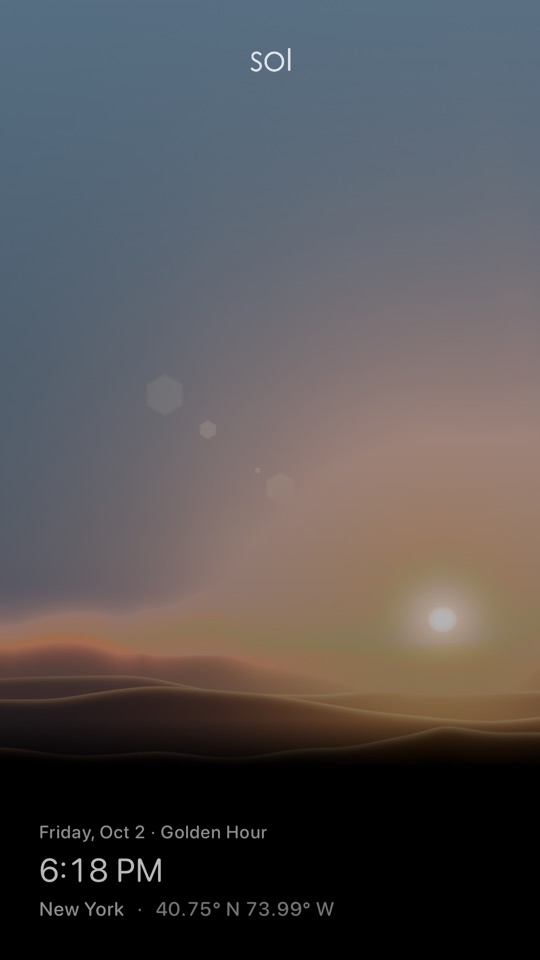
The sky over you at any minute: the sun where it stands, and after dark thousands of stars at their true brightness, the planets by name and the constellations you face. Turn the dial at its foot and it paints any minute of any day.
6:18 PM · golden hour
Or turn the dial on the phone itself. Each stop is the app’s own frame at that minute, not a drawing of one.
The night sky
Stay for the stars.
When the light goes, the catalogue comes out: thousands of stars at their true brightness, the planets by name, and the figures of the constellations coming forward as you look toward them.
Run time and the sky wheels overhead in long exposures. The ISS, Tiangong and Hubble cross at their real places, and the year’s meteor showers fall from their radiants. Tap the moon for its phase and its rising.

The Sky tab, with Saturn · 9:00 PM
The Globe tab
See where the night is falling.
The whole Earth with the line of night across it and the cities lit on its dark side, every one on its own hour. Scrub the clock and the terminator sweeps over the oceans.

The Globe tab · 8:45 PM
The Orbit tab
Out past the sky.
The planets on their real paths at the real moment, with the constellations behind them — the same clock as every other room, wound out a few hundred million kilometres. Tap a planet and ride along with it.

The Orbit tab · 8:45 PM
Your home
The Shadow tab Pro
See the sun on every window, before you sign.
Sol stands the building at its real height among its neighbours, from OpenStreetMap and Overture’s map of buildings, and counts each window’s hours of sun, today, at the solstices and at the equinox.
Tap any spot on the ground for its hours of sun at a standing person’s height, or a neighbour for its roof’s. The trees are in leaf from May to September and thin from November to March, and their shadows with them. Search any address and go and stand there.
Map data © OpenStreetMap contributors and the Overture Maps Foundation.

Your building · 2 October

One window’s report · 3:30 PM
4:45 PM · shadow 0.8 mi east-north-east
Or turn the dial on the phone. It steps through 2 October every ninety minutes, from 7:45 in the morning to golden hour.
Every day
Rituals
Four windows a day, into the light.
Dawn, noon, sunset and dusk each open a window to step outside for. Add acts of your own to the light — a walk at golden hour, screens down at dusk — and Sol sends an alert when each one opens.
What you keep is kept: twenty weeks of it on one grid, over the daylight you actually stood in. The dawn ritual is free; the whole day is Pro.

The light journal · an example month
Your four windows today, where you are.
From first light until an hour after sunrise.
The daily games
A city from its sky. An hour from a shadow.
The Almanac shows you a city by its sky alone — its day, its year, its noon shadow, its moon, its stars and its clock — one more clue with every guess, and six guesses to name it. The Gnomon stands a famous building under that day’s sun at an hour kept secret, and its shadow is the only clue.
Everyone plays the same number on the same day. What you share is your row of circles, never the answer, so it can go to a friend who has not played yet. Both are free, and both play here in a browser today.
Play today’s AlmanacPlay today’s Gnomon
The Gnomon’s buildings © OpenStreetMap contributors and the Overture Maps Foundation.

The Almanac · No. 2

The Gnomon · No. 3, three readings in
Flights
On desk days, take a flight.
Pick a real route and Sol flies it in real time over the Earth, lit as it is now, while you work. Say what the flight is for before it takes off, and it asks whether you did it as you land.
One a day is free; with Sol Pro, as many as you like, and the iconic aircraft.

New York to Boston · 20 minutes in
The Year in Light
A year of your own light.
The daylight you stood in, from Time in Daylight on Apple Watch, laid round the year as a ring — one mark a day, so the long bright weeks and the dark ones are there to see at a glance.

An example year
The World board
Every sky you love, side by side.
The places you care about, each under its own sky at its own hour — golden hour in New York, past midnight in Paris, a pink dawn in Singapore, a blue morning in Tokyo.
Fling the board and time keeps turning in all of them at once, the stars trailing by night and the sun tracing its path by day. A friend who shares their city stands on the board too, under its own sky.

The World board · 6:18 PM
And the rest of the light.
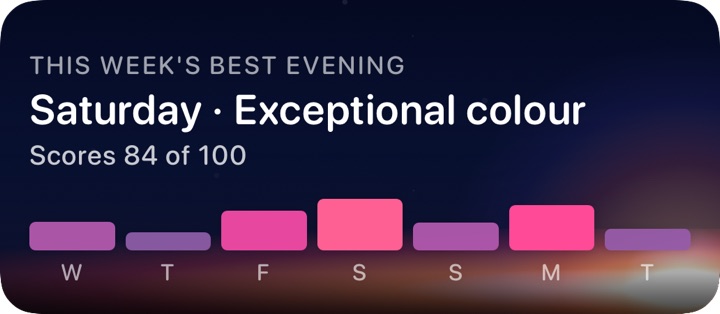
Siri and Shortcuts
“Sunset in Tokyo with Sol.” “Best sunset this week in Sol.” Siri answers on a card painted in that moment’s own light. The week ahead is part of Sol Pro.
Live Activities
The sun, the moon or a ritual’s window counting down on the Lock Screen while it is open.
Controls
The next light, tonight’s sunset and the moon, one press away in Control Center.
The sunrise forecast
Sunrise colour follows the same physics. Sol reads the cloud to the east before dawn, and its alert works like the sunset’s.
Your record
Ten minutes after sunset Sol asks what you saw. After eight evenings, it tells you how often it was right.
The share card
Tonight’s forecast over its own sky, stamped with the place and the hour, ready to send.
Trips
A city’s year of light and weather for choosing when to go, then the days you will be there, each under its own sky. One upcoming trip is free.
Voyages
A focus session flown through the solar system in the Orbit room, timed to land as the session ends. One a day is free.
The Astrolabe
A widget of the sky over you as an instrument’s dial. Monochrome and Sky are free, and Sol Pro holds every other dial.
Your places
Home by your phone’s own location, and any city on Earth by name, each on its own clock.
Thirteen languages
English, Deutsch, Español, Français, עברית, Bahasa Indonesia, Italiano, 日本語, 한국어, Português, Русский, Türkçe and 简体中文.


What is free, and what is Pro.
The app’s own list, as its paywall states it. Pro is shared with your family through iCloud Family Sharing.
Free
- The living sky and today's light
- Live weather in the sky and on the globe
- Home Screen widgets
- Two places of your own
- The daily dawn ritual
- Tonight's sunset forecast and alert
- A flight and a voyage a day
- One upcoming trip
Pro
Everything in Free, and:
- All-day rituals and the practice library
- The sunset week and your other skies
- Unlimited places
- The hourly light forecast
- The 3D shadow stage
- Weather 10 days ahead, in the sky and on the globe
- Unlimited saved moments
- As many flights and voyages as you like
- Iconic aircraft and spacecraft
- Trips without limit
- Your year in daylight, with its record
- Every Astrolabe dial
iPad
It knows what shape it is on.
The same day, laid out for the screen it lands on — not a phone layout stretched to fit.

iPad
Two columns: the day on one side and the weather room open on the other, instead of a sheet you have to summon.
The beta
Test Sol before it ships.
A few people get the app early, through Apple’s TestFlight, and tell us what their evenings were like. Leave your address and the invitation comes when a seat opens.
Questions before you install.
How does it know a sunset will be worth it?
It reads the cloud forecast overhead and to the west, where the sun's light has to travel, and the air in between. Hours ahead, it says in one of four words — little, some, good or exceptional colour — whether tonight is worth it. Every forecast is recorded before the evening; ten minutes after sunset the app asks what you saw, and after eight rated evenings it tells you how often it was right. The sunset pages here make the same forecast for 82 cities; the app makes it for the place you are standing.
Does it need my location?
For the place under your feet, yes — the phone's own location, and its horizon. The instruments on this site work for 82 cities and any place you type, with your browser's location if you allow it.
Which devices?
iPhone, iPad and Apple Watch, in English and twelve more languages. On iPad the Day tab opens into two columns, the plan beside the day.
Do I need an account?
No. An account on this site keeps your saved plans, rooms and teams. The app does not sign in to it yet.
When does it ship?
There is no date to promise. Leave an email above and there will be one message when it does, and nothing else. To try it sooner, ask to join the beta.
What is free on this site today?
Every instrument, for 82 cities and any place you type.
On this site
- Sunset forecast
- Sun on my window
- The moon tonight
- Golden hour
- Shadow length
- Sunlight in your room
- World time planner
- Sunset outing
- Daylight after work
- Embeds
- For assistants
Every city also has a sunset calendar to subscribe to.
Only in the app
- Your own place and its horizon
- Sunset alerts
- The living sky
- The 3D shadow stage
- Home Screen widgets
- Apple Watch
Make time for the light.
Sol for iPhone is coming soon. Leave your address for early access and one email when it ships, and the instruments on this site are free today.

Explore the light
Play and learn
More from Sol